Melodi talks to YouTube Music's public backend and plays the audio stream directly. There's no web player, so there's nothing to show ads in. No sign-up, ever.
$ melodi --about
ad-free music
in a terminal-shaped
window
A free, open-source desktop player for YouTube Music's catalog. No account, no ads, no tracking. Just a fast, keyboard-driven player with synced lyrics, playlists and seven themes.
try a theme →
features
Boxed panels, text-drawn seek bars, a vim-style status line and seven themes, from amber phosphor to a light “paper” mode. Optional CRT scanlines.
space play · j/k move · / search · f like · l lyrics · 1-3 views. Media keys work too.
Time-synced lyrics that follow the song and highlight the current line. Click a line to jump there. Falls back to plain lyrics when needed.
Full artist pages, albums and playlists, plus radio from any song or artist. Autoplay keeps similar music going when your queue ends.
Liked songs, playlists, history and settings live on your computer, not in an account. Hide artists you played by accident, clear anything any time.
Shows “Listening to <artist>” with the cover and a progress bar on your Discord profile. One toggle to turn it off.
New versions are offered in the app and install with one click, signed and verified. Its streaming engine (yt-dlp) stays current in the background.
Built with Rust and Tauri: the Windows installer is about 2 MB and it uses your system's web view instead of shipping a whole browser.
themes
Seven built-in themes. Pick one here and the whole page (and the 3D screen above) follows.
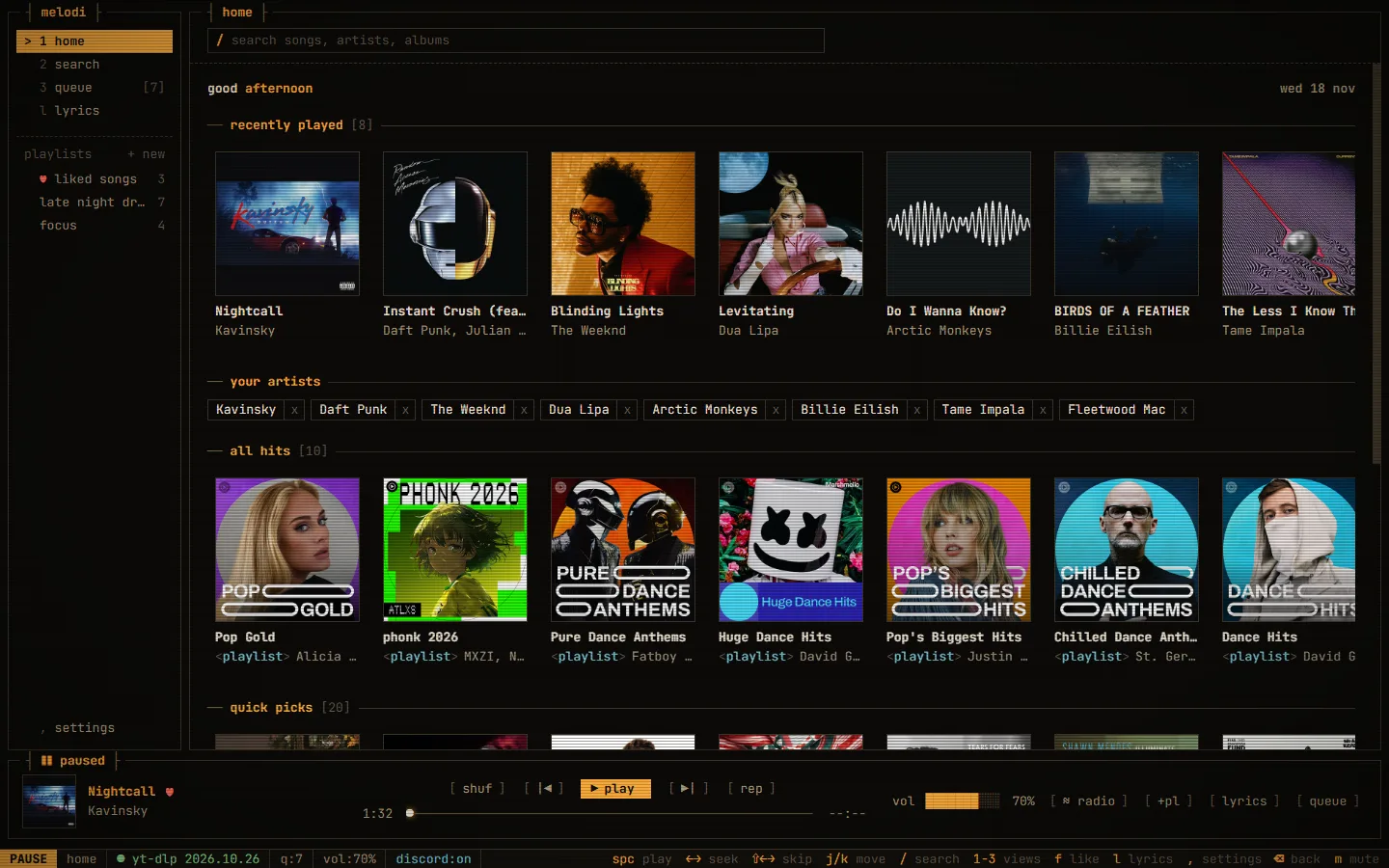
screens
install
- Download and run the installer. No admin rights needed.
- If you see “Windows protected your PC”, click More info → Run anyway. The installer isn't code-signed (that costs money); every release is built in the open by GitHub Actions.
$ chmod +x Melodi_*.AppImage
$ ./Melodi_*.AppImage
Runs on any distro and updates itself.
$ sudo apt install ./Melodi_*.deb
Update prompts link to the download page.
macOS isn't supported yet. All builds: github.com/nixxane/melodi/releases
keys
cheat sheet
- space
- play / pause
- ← →
- seek 5 s
- ⇧ ← →
- previous / next
- ↑ ↓
- volume
- j k
- move through lists
- /
- search
- 1 2 3
- home / search / queue
- f
- like current song
- l
- lyrics
- m
- mute
- ,
- settings
- ⌫
- back
faq
Is it really free? What's the catch?
No catch. Melodi is open-source under the GPL-3.0 license, has no ads and collects nothing. If you like it, you can buy me a coffee on Ko-fi.
Do I need a YouTube or Google account?
No. Search, browsing and playback all work without signing in to anything.
How does it play music without ads?
Melodi fetches song information from YouTube Music's public backend and uses yt-dlp to get the direct audio stream, which plays in the app. It never loads YouTube's web player, so there are simply no ads to show. It doesn't block anything, and it doesn't download songs.
Why does Windows warn about the installer?
Code-signing certificates cost money, and unsigned apps get a SmartScreen warning until enough people have installed them. Click More info → Run anyway. You can read every line of the source and see each release being built on GitHub.
Where is my data stored?
Only on your computer: liked songs, playlists, history and settings are kept locally. Lyrics lookups send just the song title, artist and length to LRCLIB.
A song won't play. What now?
YouTube changes things now and then. Melodi updates its yt-dlp automatically and retries, so it usually fixes itself. If it doesn't, open an issue.